Distraction Nightmare? Acura On Quest To Replace Buttons With Touch Screens
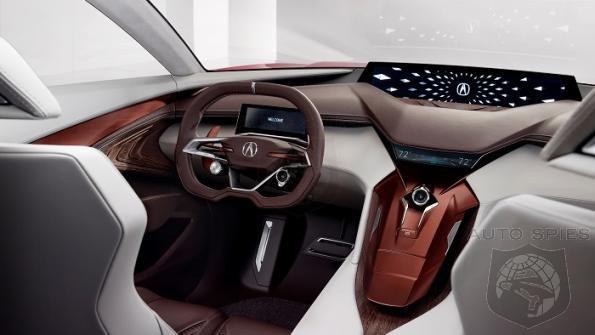
Distraction Nightmare? Acura On Quest To Replace Buttons With Touch Screens

Are buttons as endangered as the device that used to play your favorite mix tape?

Yes, says a top designer, who likens “button mode to the cassette player that stayed forever” in vehicles’ interiors.

“(Eliminating buttons) opens up a lot of structure in that center stack,” Dave Marek, global creative director-Acura, says in an interview. “There’s still a lot of hardware from the HMI (human-machine-interface) system, but it frees up design to thin out the center console. You get rid of some of that architecture behind it.”


Read Article

PUGPROUDPUGPROUD - 2/19/2016 10:56:47 AM
+2 Boost
Going to be hard to accept at first not having tactile feeling and being able to recognize different functions through feeling in fingers, one of our most sensitive senses. Way of the future for sure but is going to take getting use to change. On a whimsical note how do you respond when your effort to regulate a function results in a message on your screen that reads "Can't touch this!"


TheSteveTheSteve - 2/19/2016 12:13:33 PM
+2 Boost
The “move everything into the screen” movement offers:

PROS:
- A cleaner look on the dash, with fewer controls
- Reduced cost for the manufacturer
- Easier for manufacturer to design (it’s much harder to design)
- Easier for manufacturer to add/change features

CONS:
- Much-reduced real-time usability for the operator, as the driver becomes a “user” who must divert their attention from the road to a computer screen and input array as they navigate a screen with a changing display that shows multiple layers of menus, multiple options (usually displayed as text, which must be read and comprehended), and which require multiple steps to accomplish a task. In other words, the driver temporarily becomes a distracted computer operator while they perform common tasks.


Here are a couple examples of how moving common functionality from analog-style controls to a computer screen has increased the number of steps required…
_____________________________

In the old days, I used to be able to turn down the bass on that too-boomy song as follows:
(1) Turn a dial counterclockwise

In today’s screen-based dashboard, I do the following:
(0) Press the Radio button
(1) Read the screen to identify the available options
(2) Press the Sound soft key
(3) Read the screen to identify the available options
(4) Turn the Dial to navigate through the options, and stop at Tone
(5) Press the Dial to make activate Tone
(6) Read the screen to identify the available options
(7) Turn the Dial to navigate through the options, and stop at Bass
(8) Press the Dial to activate the Bass parameter
(9) Turn the Dial counterclockwise to reduce the bass
(10) Press the Dial to save my new bass setting
(11) Press the Back button multiple times as I watch the screen, to back out to the main screen

_____________________________

In the old days, when I wanted to change which air vents would emit air (windscreen, mid/face, low/feet), I would do the following:
(1) Press a button for low/feet to turn that airflow off

In today’s screen-based dashboard, I do the following:
(1) Press the Air Flow button
(2) Look at the screen to see a bunch of tiny, similar looking icons depicting possible combinations of windscreen/mid/low, and identify which one I want.
(3) Look at the screen to determine my current setting, and ascertain if I need to turn the dial clockwise or counterclockwise to go from my current setting to my desired setting (i.e., 1 click left, or 7 clicks right?)
(4) Turn the Temperature Dial -- which has now temporarily become an Air Flow Direction Dial -- while watching the screen, and stop when it points to the icon that represents my desired air flow pattern.
(5) Press the dial to make my air flow selection.


[Example pertains to a 2015 Audi Q5]


TheSteveTheSteve - 2/19/2016 12:15:34 PM
+1 Boost
CORRECTION:

original text:
"- Easier for manufacturer to design (it’s much harder to design)"

corrected text:
- Easier for manufacturer to design (it’s much harder to design a good user interface with analog-style controls than a suboptimal one on a computer screen)


runninglogan1runninglogan1 - 2/19/2016 5:14:40 PM
+2 Boost
Really? You had a car with a knob to adjust the bass?


Vette71Vette71 - 2/19/2016 7:10:19 PM
+3 Boost
Simple controls. Yes every radio had a bass treble knob. Fast easy and one didn't have to take one;s eyes off the road. These ouch screen menus area huge step backwards. Just because you can do something with a computer doesn't men you should.


cidflekkencidflekken - 2/19/2016 12:46:20 PM
+2 Boost
Technological advancement. It's inevitable. Unless we all stop buying cars, then there's probably no way to stop it.

And Acura/Honda isn't the only brand going there.


LexSucksLexSucks - 2/19/2016 3:37:37 PM
+2 Boost
Good luck adjusting the bass and treble with that thing. Also, good luck trying to make any adjustment without taking your eyes off the road. And this is progress? EPA will knock this thing down if they cared anything about safety.


bw5011bw5011 - 2/19/2016 4:37:30 PM
+3 Boost
I will say this about Acura. I owned a 04-06 TL and the speech recognition was excellent. I would press one button and say, Air Condition, Fan High, Floor... something like that and it worked. Now it did come back and tell me what time it was a few times but for the most part, I was able to keep my eyes on the road. On the flip side, sitting in my Audi's, I just deal with the screen, getting that awkward sounding "Pardon Me" is super annoying.


MDarringerMDarringer - 2/19/2016 7:13:49 PM
+3 Boost
Buttons and knobs require very little attention off the road, but a touch screen demands it.


dumpstydumpsty - 2/21/2016 5:59:00 PM
+1 Boost
We're quickly moving away from having screens dedicated to showing 1 or 2 types of info - which was easily readable at a glance. Today's vehicle information display systems are becoming more & more complex. It will soon be necessary to sit & program all the driver settings before driving a new car off the lot.


dstampferdstampfer - 2/22/2016 8:59:20 AM
+1 Boost
My wife's 2013 Acura MDX lease is up-- the last year before they updated to current center stack design- the newest is not as barren of buttons as concept photo above but has dramatically fewer than hers does. Test drove the '16 this weekend-- hate the new design for reasons mentioned in comments- i.e. more focus on the computer screen to get anything done. Meanwhile, they've also made it so you can't change many setting while driving-- even if you're the passenger......


cidflekkencidflekken - 2/23/2016 2:06:00 AM
+1 Boost
Maybe I'm just a creature of habit, but I have no idea what you people do in your cars every day. When I get a new car, I set my sound settings then practically never touch them again. I might adjust the car's temperature settings a few times a year as seasons change, but I leave it in Auto and it treats me just fine. If I need to adjust volume, I use the steering wheel buttons. Simple, intuitive, and don't need to take my eyes off the road. If I need to make a call, I use voice or the buttons on the steering wheel with my heads-up display. Navigation, I stop like you should. Radio stations, I don't bother with because radio sucks. Except XM radio and that's easy to get to. Most everything else I need the Info screen for I can wait until I'm stopped because nothing is that urgent anyway.


Copyright 2026 AutoSpies.com, LLC